meta data for this page
Graphic - Text
Dialog selections are discussed below the image. To navigate to an item, select it in the [insert] image. If NOT selecting any item and wanting to return to the prior page: swipe right-to-left; use the browser’s ‘back’ arrow; or use the Wiki’s Backlink icon  on the right sidebar (mobile: drop-down dialog at the top of the page).
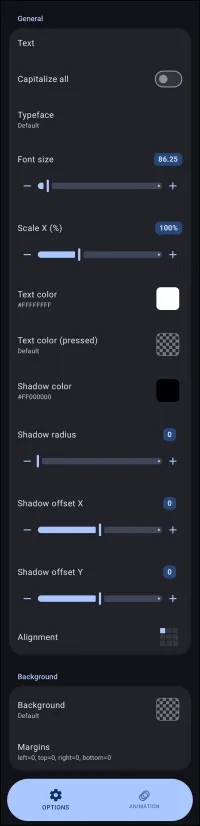
Graphic - Text dialog. Make selection above.
This dialog screen shows options for:
- Text - Select to input a text string (static) or assign dynamic variables, such as date and time formats like
hh:mm, notification events, system readings, Tasker or MacroDroid variables, and more. - Capitalize all - Toggle the checkbox to automatically convert all characters in the text string to uppercase.
- Typeface - Select the specific font family and style, such as
Sans serif, Bold, to apply to the text. The source is from the launcher's 'Resource' area, which defaults to Roboto. Learn how to import other fonts here. - Font size - Set the typographic size of the text characters.
- Scale X(%) - Adjust the horizontal width scaling of the text characters.
- Text color - Set the default color for the selected text.
- Text color (pressed) - Set the color of the text displayed when the object is actively pressed.
- Shadow color - Set the color used for the text's drop shadow effect.
- Shadow radius - Define the blur intensity for the shadow effect rendered behind the text. Disabled by default (0).
- Shadow offset X - Controls the horizontal shift distance of the text shadow relative to the main text.
- Shadow offset Y - Control the vertical shift distance of the text shadow relative to the main text.
- Alignment - Determine the anchoring direction of the text within its bounding area.
- Background - Define the background image, shape, or color situated behind the text object.
- Margins - Adjust the interior padding on the left, top, right, and bottom edges between the text and its background container. For a complete review of both object and page margins see here.
===== Hidden Index Anchors ===== ui-graphic-text_type ui-launcher_options-resources-typeface ui-graphic-text-text_color ui-graphic-text-color_pressed ui-graphic-text-shadow_color ui-graphic-text-alignment ui-generic-background ui-generic-margin ui-animation-no_exit
You could leave a comment if you were logged in.
Comments & Feedback
Toby Lancer is ready to help! Look for the Quick Help form:
► Desktop: left sidebar located near the bottom for Private to Admin
► Mobile: 3-bar menu at page top.
► Use the Discussion section below to share any experiences and communications with other Total Launcher users.
► Any Registered User can directly update this and any wiki page if desired.
Moderation: To keep the manual clean, all comments are held for appropriateness review. Preview any comment before submitting it. It will not be displayed after submission until it is reviewed. So, please, do not resubmit.
Formatting: If using any code snippets, place them inside code tags (e.g., 'code') using double single quotes (') before and after to keep them readable.
Be Kind: This is a community effort. Please keep feedback constructive and on topic.
~~DISCUSSION~~