meta data for this page
Feature Requests And Status
Total Launcher users can request new features be considered for addition to the app by submitting a #FeatureRequest. This area of the uiTLM wiki will track Feature Requests, monitor their status, and provide users and the developer, ChYK, with a consolidated source of requests.
Use this Page's Table of Contents to see a listing of recorded Feature Requests, or scroll manually through the list below.
Actual Feature Requests are not to be made at this wiki. Instead, all Feature Requests are to be made at the Official Total Launcher Telegram Group in the following format:
HOW TO SUBMIT A FEATURE REQUEST
Feature requests can be submitted to ChYK by adding #FeatureRequest to the beginning of any post at Official Total Launcher Telegram Group with the nature and reason for that feature.
Will I get any feedback?
#FeatureRequests are read by the Dev for consideration, and if implemented, actioned through the Play Store update mechanism; it would be unrealistic for ChYK to respond individually and in person to every request.
Consolidated Listing: January 1, 2026 - August 1, 2026
App Category Additions
Date: 20260728 By: PirateBugdroid Method: Telegram Official Total Launcher Group
Description
Being able to add entire categories of apps in folders/app groups, for example games, social media, etc., instead of manually adding an app to a folder after installing it, it could simply spawn in the folder/app group. This would also be useful for sharing themes across different devices with different users because not everyone uses the same apps.
Status
No report.
App Drawer: Alphabetic Search Visualization
Date: 20260702
By: Doreps
Method: Telegram Official Total Launcher Group
Description
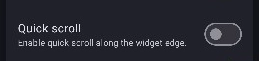
Use the customization option to set the default search icon interaction in the app drawer to a linear, one-column alphabetic listing for scrolling and selection. This is identical to that available in the sister app “Square Home”.
Status
Resolved: This feature existed: In the 'Drawer' Edit Option dialog, select the **Quick Scroll** option, which is then activated in the drawer with a right edge drag.
App Drawer: Locked With Launcher Action Exit
Date: 20260210
By: Omarilzz
Method: Telegram Official Total Launcher Group
Description
Tag locked app drawer ( an app drawer that only shows a specific tag, which cannot be exited ) and a remove tag or exit launcher action
Status No report
App Drawer: Pages For Tagged Items
Date: 20260715
By: Gilrandir
Method: Telegram Official Total Launcher Group
Description
Have an option in the drawer that automatically creates pages for each tag, allowing you to browse the various pages without choosing the tag each time. (e.g., as in Smart Launcher).
Status
No report
App Drawer: Pre-designed To Separate User And Work Apps
Date: 20260124
By: AAM
Method: Telegram Official Total Launcher Group
Description
Pre-designed app drawer, in addition to the existing option to design their own. I would love to see an app drawer that separates user and work apps, similar to the One UI drawer.
Status
No report
App Search Bar: Customization
Date: 20260210
By: Omarilzz
Method: Telegram Official Total Launcher Group
Description
Customizable app search bar, e.g size, color, positioning and look
Status No report
Blur: Add Levels
Date: 20260101
By: Big Owl
Method: Telegram Official Total Launcher Group
Description
Add different levels of blur and transparency like glass?
Status
No report
Checklist: Font Option
Date: 20260713
By: Taza Rap
Method: Telegram Official Total Launcher Group
Description
When adding the “checklist” widget and trying to change the font, I noticed the option wasn't available. I would like to add this option.
Status
No report
Color Resources
Date: 20260716
By: Yanthrik
Method: Telegram Official Total Launcher Group
Description
Ability to add colors as global resources, which can later be used in other items like shapes. Follows the same idea; changing such a color reflects everywhere it is used.
Status
Possible workaround: Activate the Launcher Option Dynamic Color Scheme, then for desired objects, select Dynamic color and select Custom color, which will globally cause all elements in that object's role to display as desired.
Color Tone Variations
Date: 20260716
By: Yanthrik\ \
Method: Telegram Official Total Launcher Group
Description
Ability to create more such colors *based* on existing ones!
For example, I create one colour #FFFF0000 (red), and then I create another colour based on the first colour with a hue offset of 180°, then effectively I get a colour which looks like #FF00FFFF (cyan).
The use case is:
- Ability to create palettes by simply hue shifting a shade, for example, Pastel Shades.
- Ability to extrapolate on Material Colours, for example, I can create a colour based on Material Primary Container, except that it's only 20% transparent. This allows me to create better Icon Group Background Shape which blends with the background better.
Note: I'm using Tapet to have my backgrounds change frequently, hence, need some dynamism with respect to material colours.
Status
No report.
Element Continuation To Next Page
Date: 20260210
By: Omarilzz
Method: Telegram Official Total Launcher Group
Description
Elements that can cross pages, which can appear on the end of a page and still continue on the other (not talking about pinning)
Status No report
Fidget Spinner: Increase the Number of Icons
Date: 20260715
By: Gilrandir
Method: Method: Telegram Official Total Launcher Group
Description
Increase the number of spinner icons from 12 to at least 16.
Status
No report
IF Condition
Date: 20260210
By: Omarilzz
Method: Telegram Official Total Launcher Group
Description
If conditions to control values for e.g scrolling percentage between each page
Status
No report
Image Resources
Date: 20260704
By: PirateBugdroid
Method: Telegram Official Total Launcher Group
Description
Select all button to delete image resources.
Status
While this option is not available in the Launcher Options > Resources > Image dialog, it can be accomplished in the Object Options Edit > Image > Image dialog, then selecting any image to reveal the ✔✔ icon in the upper right, which allows tagging all images for deletion.
Launcher Action: Un-Hide Object
Date: 20260531
By: Doreps
Method: Telegram Official Total Launcher Group
Description
Current: The Object Action dialog offers the option “Invisible when edit mode is off,” which 'hides' any object when Edit Off is effective and the launcher is running. If the object has an action link, such as opening an app, tapping the area will still trigger the action and the app will open. This is great for hidden actions.
Requested:
Add a Launcher Action to reverse the current setting in the Object Action dialog. A “toggle” Launcher action and a discreet “Hide”/“Show” selection would provide many customization options for setup designers and users.
Why the current workarounds are inefficient: While this behavior can currently be simulated, the workarounds introduce significant design friction:
• Using a Window: Requires creating a separate, transparent window container to hold and toggle a single object.
• Using Multi-Page Swaps: Requires cloning layouts and globally enabling “Disable page transition by touch” under >Key & Gesture, which sacrifices normal page swiping for the rest of the layout.
• Using Invisible Overlays: Stacking an invisible object on top of a visible one works for launching apps, but cannot dynamically reveal/hide graphic elements on command.
Example Use Case:
A user could create a clean, minimalist home screen with a single discreet button. Tapping that button triggers the Launcher Action to “Show” a hidden group of favorite app icons or widgets, and tapping it again toggles them back to “Hide,” eliminating the need for complex multi-page or window setups.
Status
No report
Scroll The Page To: Sync To Multiple Pages
Date: 20260210
By: Omarilzz
Method: Telegram Official Total Launcher Group
Description
Option to sync each page scrolling percentage, e.g if page 1 is a 100%, then page 2 is 100%; if page 2 was taken down to 0%, page 3 would be 0% and page 1 0% as well, meaning both perv and next page
Status
No report
Slider Widget: Hit Box Rotation
Date: 20260713
By: Taza Rap
Method: Telegram Official Total Launcher Group
Description
Adjust the hitbox of the “slider” widget when rotating it vertically, since the hitbox remains horizontal. Making it very difficult to use when placed vertically.
Status
No report
Media Play Controls: Separate Them
Date: 20260714
By: AunG
Method: Telegram Official Total Launcher Group
Description
Regarding the media player controller widget: please separate the play, next, and back controls from the album art and artist/track title—do not group them all together. If possible, implement them like dynamic images.
Status
No report
Widget Stacking
Date: 20260505
By: sperareine
Method: Telegram Official Total Launcher Group
Description
Enable widget stacking similar to Samsung's OneUI
Status
No report
Widget (Music): Add Sound Spectrum Analyzer
Date: 20260123
By: Big Owl
Method: Telegram Official Total Launcher Group
Description
Adding a sound spectrum analyzer to the music widget, similar to those in Windows Media Player?
Status
No report
Comments & Feedback
Toby Lancer is ready to help! Look for the Quick Help form:
► Desktop: left sidebar located near the bottom for Private to Admin
► Mobile: 3-bar menu at page top.
► Use the Discussion section below to share any experiences and communications with other Total Launcher users.
► Any Registered User can directly update this and any wiki page if desired.
Moderation: To keep the manual clean, all comments are held for appropriateness review. Preview any comment before submitting it. It will not be displayed after submission until it is reviewed. So, please, do not resubmit.
Formatting: If using any code snippets, place them inside code tags (e.g., 'code') using double single quotes (') before and after to keep them readable.
Be Kind: This is a community effort. Please keep feedback constructive and on topic.
~~DISCUSSION~~