meta data for this page
Translations of this page:
- en
This is an old revision of the document!
Resource: Typeface
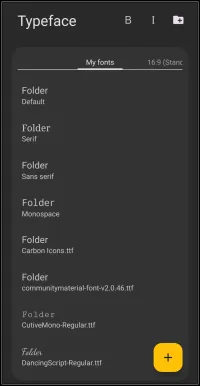
This dialog screen shows options for:
- B - Applies bold formatting to the currently selected typeface.
- I - Applies italic formatting to the currently selected typeface.
 Folder with Plus Icon - Opens the system file picker to import custom font files into the launcher resources.
- My fonts - Displays the current active list of typefaces available for application to launcher objects.
- 16:9 (Standard) / Aspect Ratio Tabs - Represents optional screen resolutions for use. Determines the specific resources loaded based on the device screen ratio to prevent display skewing of elements (such as images or text).
- This dialog in the app would scroll to the right revealing alternative resolution options heavily utilized by multi-screen devices, including:
16:9 (Standard)representing standard 1080×2400 resolution18:9 (medium screen)18.5:9 (Long screen)19:9 (Long screen medium)19.3:9 (long screen medium +)19.5:9 (Long screen +)20:9 (Extra long screen)21:9 (Super long screen)22:9 (Flip - Super long screen)25:9+2.5:18 (Fold)25:9 (Extremely long screen)22.5:18 (Squarish screen)5:8 (Tablet)
 icon - Opens the menu to add a single, new typeface resource to the current list.


Comments & Feedback
Toby Lancer is ready to help! Look for the Quick Help form:
► Desktop: left sidebar located near the bottom for Private to Admin
► Mobile: 3-bar menu at page top.
► Use the Discussion section below to share any experiences and communications with other Total Launcher users.
► Any Registered User can directly update this and any wiki page if desired.
Moderation: To keep the manual clean, all comments are held for appropriateness review. Preview any comment before submitting it. It will not display after submission until reviewed. So, please, do not resubmit.
Formatting: If using any code snippets place them inside code tags (e.g., 'code') using double single quotes (') before and after to keep them readable.
Be Kind: This is a community effort. Please keep feedback constructive and on topic.
~~DISCUSSION~~