meta data for this page
Translations of this page:
- en
<insert previous page>
Shadow - Add
Dialog selections are discussed below the image. For navigation to an item make a selection in the Shadow - Add image.
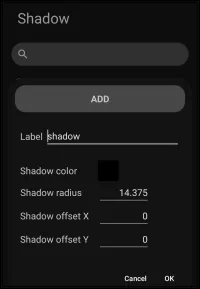
Shadow - Add dialog. Make selection above.
- Shadow color - Tap to select the desired color options for the shadow. The image selected for this demo was black (unfortunately making the color basically invisible). Sorry!
- Cancel - Tap to deactivate any data entries and return to the original page
- OK - Tap to activate any data entries and navigate to next page.
Other items of note in this image are:
- Label - The title to assign to the user-created effect for the object. No spaces permitted on the underscore (_), letters, and numbers.
- Shadow radius - Selection would open a number pad to input the radius of the shadow which represents the distance from the object body in pixels. This demo will not enable a number pad.
- Shadow offset X - Selection would open a number pad to input the offset of the shadow. X represents the x-axis direction of the shadow, with a positive number for right-side, a negative number for left-side, in pixels. This demo will not enable a number pad.
- Shadow offset Y** - Selection would open a number pad to input the offset of the shadow. Y represents the y-axis directions of the shadow with a positive number for upward, a negative number for downward, in pixels. This demo will not enable a number pad.
 Search - While the titles of the shadow designs are visible and scrollable, text could be entered to locate a user-named shadow that was previously created. No text will be entered in this demo.
Comments & Feedback
Toby Lancer is ready to help! Look for the Quick Help form:
► Desktop: left sidebar located near the bottom for Private to Admin
► Mobile: 3-bar menu at page top.
► Use the Discussion section below to share any experiences and communications with other Total Launcher users.
► Any Registered User can directly update this and any wiki page if desired.
Moderation: To keep the manual clean, all comments are held for appropriateness review. Preview any comment before submitting it. It will not display after submission until reviewed. So, please, do not resubmit.
Formatting: If using any code snippets place them inside code tags (e.g., 'code') using double single quotes (') before and after to keep them readable.
Be Kind: This is a community effort. Please keep feedback constructive and on topic.
~~DISCUSSION~~