<insert previous page>
Widget Selection
Dialog selections are discussed below the image. For navigation to an item make a selection in the Widget Selection image.
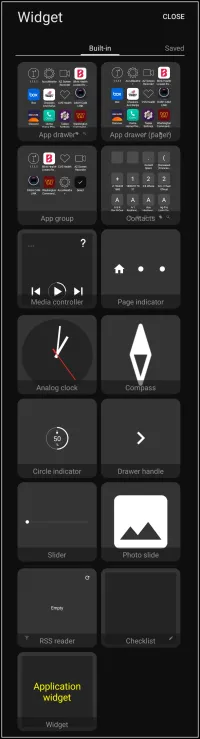
Widget Selection dialog. Make selection above.
- Close - Cancels any selection and navigates to the previous page.
- App drawer - Customizable container to hold all of the device's applications icons offering search, tag and sort functions with icon vertical scrolling
- App drawer (pager) - Another customizable container to hold user-selected application icons and folders with either vertical or horizontal scrolling also referred to as paging.
- App group - Container to display a selected set of application icons relying heavily on user-created tags to group and automatically update the widget when a new application is tagged. Offers a layout of columns and rows (grid) or single column and rows
- Contacts - Container to display either all contacts but can be set to group or show by assigned tag which allows much customization. This will also the contacts image as a default if included in the system contact manager; if not a default user-selected icon or image can be used.
- Media controller - audio or video player control set displayed for functional management
- Page indicator - Navigation indicator to show current location within an available range
- Analog clock - Clock face with hour, minute, second hands. Background and hands can be customized.
- Compass - North-pointing directional needle which can be customized with user-selected graphics
- Circle indicator - Circle representing a data value of the device's battery, ram usage, internal storage, or SD card (if available)
- Drawer handle - Offers an additional linked object to a sliding drawer (4 total) to give an expanded physical area to open/close the drawer
- Slider - visible control to manage a linked screen brightness or volumes
- Photo slide - A photo show window to sequentially or randomly display images (or force grayscale) from a designated folder in user-selected intervals. The window skin and corner radius can be modified
- RSS reader - Really Simple Syndication for news, podcasts and other channels or aggregation services. The container will support both image with text or text only based on the aggregator's setup. Accepts standard URLs with an undetermined number of slots (at least 20 tested)
- Checklist - A structured list to itemize tasks or setups needed to be completed or verified to track progress with each item preceded with a active checkbox for user to indicate “completion” and an edit icon used to enter it's checklist dialog for creating, deleting, and managing the list.
- Application widget - Android application developers will encode widget containers for specialized data display setups for their applications. When this is available with the application Total Launcher extracts those widgets to display in the application widget dialog for the user to select and install on a page, drawer, or window.
Comments & Feedback
Toby Lancer is ready to help! Look for the Quick Help form:
► Desktop: left sidebar located near the bottom for Private to Admin
► Mobile: 3-bar menu at page top.
► Use the Discussion section below to share any experiences and communications with other Total Launcher users.
► Any Registered User can directly update this and any wiki page if desired.
Moderation: To keep the manual clean, all comments are held for appropriateness review. Preview any comment before submitting it. It will not display after submission until reviewed. So, please, do not resubmit.
Formatting: If using any code snippets place them inside code tags (e.g., 'code') using double single quotes (') before and after to keep them readable.
Be Kind: This is a community effort. Please keep feedback constructive and on topic.
~~DISCUSSION~~