Table of Contents
Shadows: Rule 3 - The "1% Alpha" Workaround
To create a completely transparent, hollow shape that successfully displays a solid border and casts a shadow, the rendering engine's binary logic must be tricked. Under normal conditions, absolute transparency (0% Alpha) causes the engine to skip shadow calculations entirely.
The Technical Fix
- The Action: - Set the shape's Alpha Fill opacity for Color 1 and Color 2 to
01, resulting inARGB 01000000(black) orARGB 01FFFFFF(white). - Border Requirement: - A border width of at least
3or5is required. A width of1may be mathematically clipped away by anti-aliasing on high-resolution screens. - Resulting Effect: - A hollow ring shadow that mirrors the border outline is cast rather than a solid dark circle.
Why This Happens
The 01 value represents approximately 0.4% opacity. To the human eye, the center remains completely transparent. Mathematically, however, the engine recognizes a >0% fill, which forces the calculation of the object's border and shadow. Because the fill is only 1% opaque, its specific shadow is functionally invisible, leaving only the shadow cast by the fully opaque border.
Technical Proof: Test 5
The following results from the controlled Test Matrix prove that Test 5 is the only configuration that bypasses the “Zero-Alpha” limitation to produce a hollow shadow.
| Rendering Matrix (The Cause) | Visual Results (The Effect) |
|---|---|
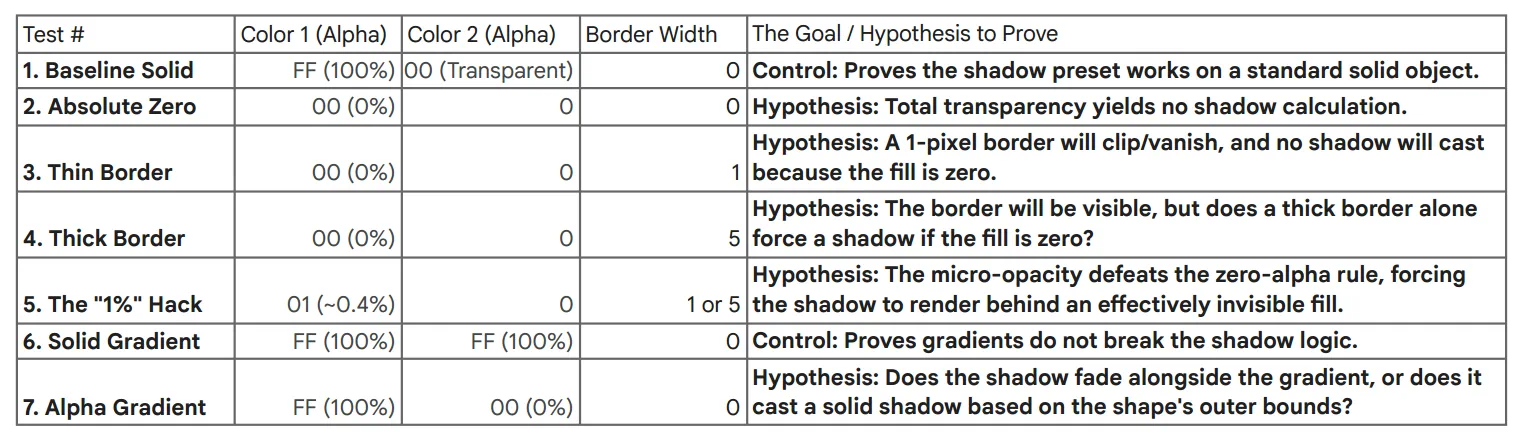 | 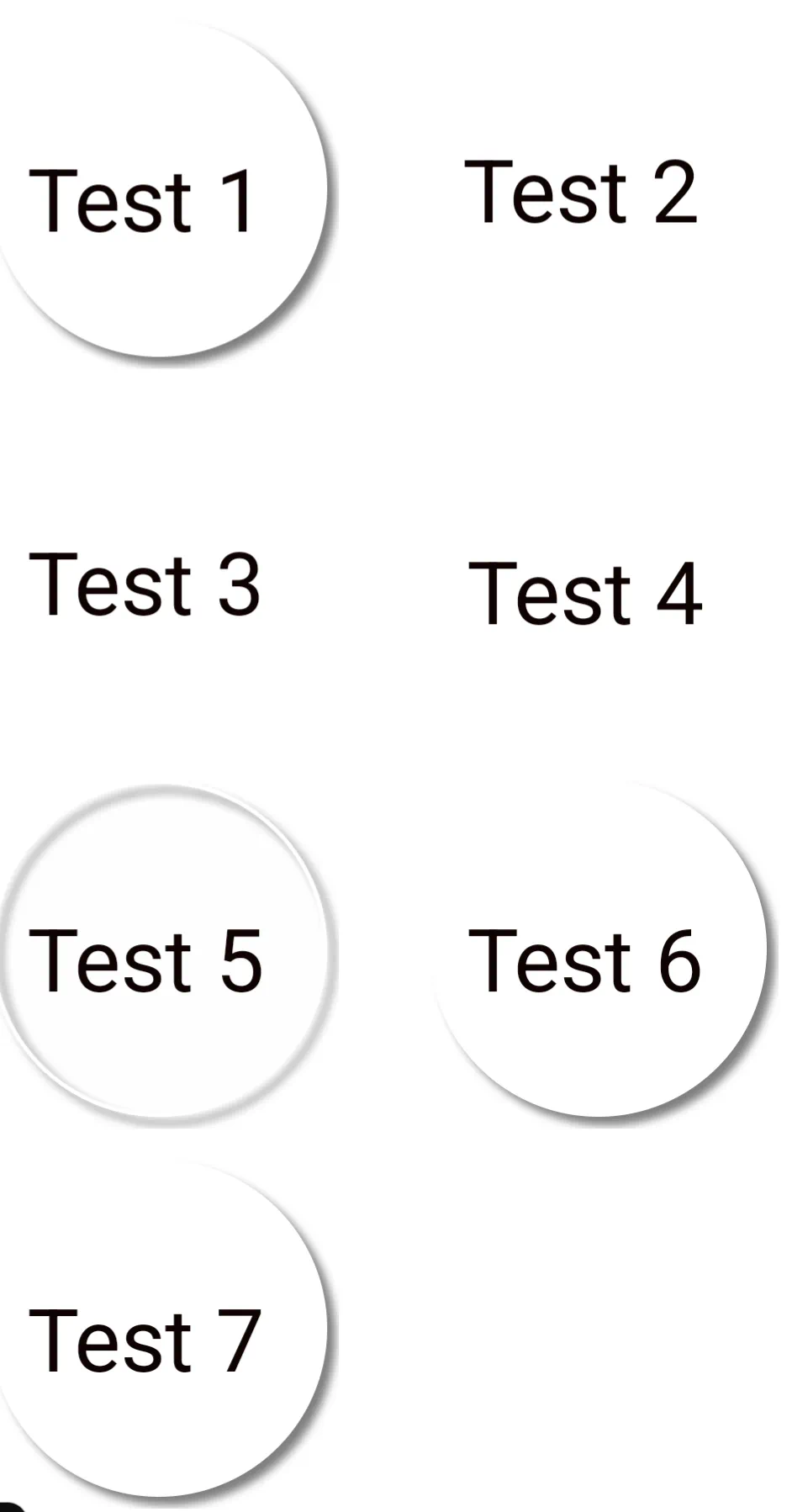 |
- Test 5 (The Success): - Demonstrates that the micro-opacity successfully forces the shadow to render behind an effectively invisible fill[cite:.
- Tests 2, 3, & 4 (The Failures): - Confirm that absolute 0% Alpha Fill results in no shadow calculation, regardless of border thickness.
Practical Comparison
The success of Rule 3 is highly dependent on background contrast.
| Success: White Ring on Blue ↔️ Failure: Dark Frame on Dark Blue |
|---|
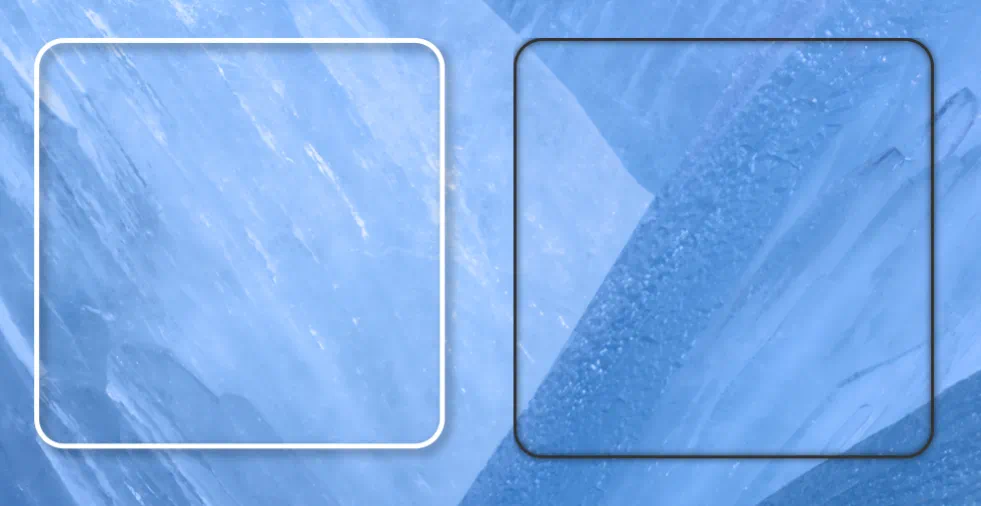 |
| High luminance separation … the hollow shadow clearly visible. | Low luminance shadow “sinks” into the background (The Contrast Wall). |
Comments & Feedback
Toby Lancer is ready to help! Look for the Quick Help form:
► Desktop: left sidebar located near the bottom for Private to Admin
► Mobile: 3-bar menu at page top.
► Use the Discussion section below to share any experiences and communications with other Total Launcher users.
► Any Registered User can directly update this and any wiki page if desired.
Moderation: To keep the manual clean, all comments are held for appropriateness review. Preview any comment before submitting it. It will not display after submission until reviewed. So, please, do not resubmit.
Formatting: If using any code snippets place them inside code tags (e.g., 'code') using double single quotes (') before and after to keep them readable.
Be Kind: This is a community effort. Please keep feedback constructive and on topic.
~~DISCUSSION~~