Table of Contents
Common Issues and Solutions
Application Widgets: Not Updating
If a widget (such as a Clock or Battery monitor) lags or stops updating, the issue is usually with the Android System, not the launcher. Go to the device's Android Settings > Apps, locate the app providing the widget and ensure that app is excluded from “Battery Optimization” or “Deep Sleep” features of the device.
Icon Labels: horizonal black lines
- There may be horizontal black lines visible (intermittently) on either side of the icon whether in an App Drawer, App Drawer (Pager), or others. See an example here . This is frequently caused by the
Labeltext having more characters than the line properly handles.
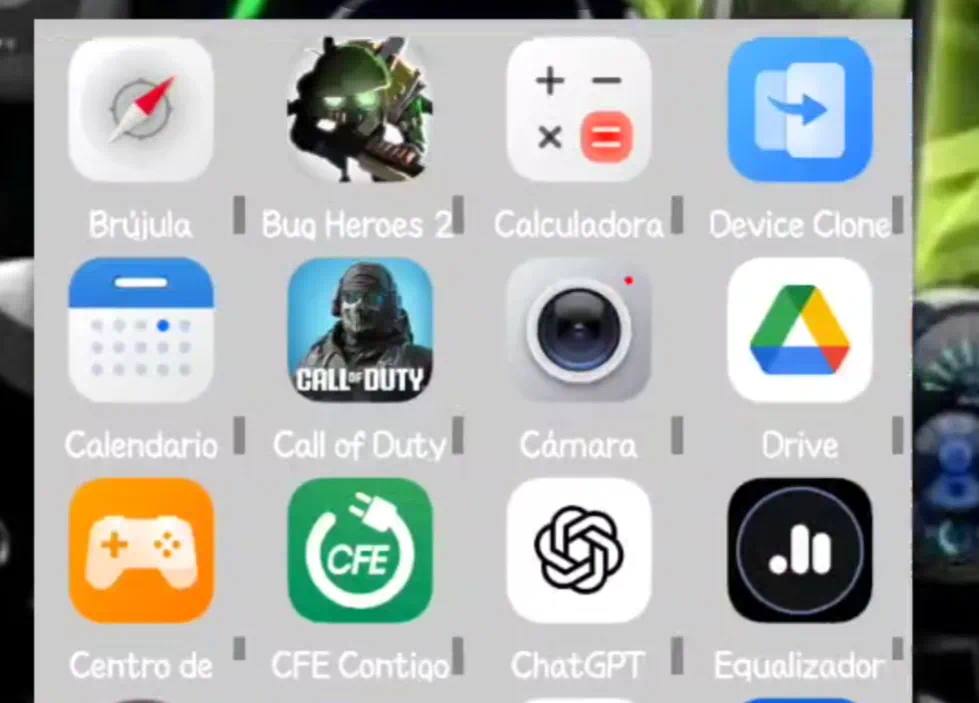
- Solution:
- Use less letters in the label line
- Change the font size
- If using 1 label line set the label line to 2
- If using >2 label lines, try reducing the number of label lines by 1
Lifetime Purchase Not Showing
AA recent purchase of a lifetime subscription to Total Launcher is not reflected on the device with features not being available.
- Solution:
- Clear Google Play Store cache on the device (
Device settings>All apps>Google Play Store>Storage & cache>Clear cache)
Temperature (text variable) does not update
This is a known issue and several Bug Reports have been submitted, but it continues to exist. The launcher's developer has not responded about the cause but some discussions have suggested it is related to the OpenWeather API limitation imposed on Total Launcher. Workarounds offered:
- Portrait/Landscape Mode Switch - as of this writing it has been verified that physically changing the devices orientation from portrait (vertical) to landscape (horizontal) causes an update.
- Launcher Action - Reset Home - It has been suggested this can be accomplished by using
Reset Homewhich causes the launcher to refresh, but it also resets the launcher to that “home page”.This has been tested but it fails whereas the portrait/landscape switch does work. This is most likely due to Android treating User Interaction (rotating, clicking, swiping) as a high-priority and internal calls from launcher activities now have greater restrictions. Bottom line: Android limitations.
There are other options to display temperature or other dynamic variables by using automation apps such as Tasker or Macrodroid. An example could be demonstrated here to be inserted
Wallpaper Momentarily Flashes a Previous Background
To resolve this visual glitch try this:
Main menu>Launcher Options>UI & Animation>Enter Animation> Set to “System default”- Do NOT use “No animation”
This has worked many times in preventing the “flashing” of old background images.
Comments & Feedback
Toby Lancer is ready to help! Look for the Quick Help form:
► Desktop: left sidebar located near the bottom for Private to Admin
► Mobile: 3-bar menu at page top.
► Use the Discussion section below to share any experiences and communications with other Total Launcher users.
► Any Registered User can directly update this and any wiki page if desired.
Moderation: To keep the manual clean, all comments are held for appropriateness review. Preview any comment before submitting it. It will not display after submission until reviewed. So, please, do not resubmit.
Formatting: If using any code snippets place them inside code tags (e.g., 'code') using double single quotes (') before and after to keep them readable.
Be Kind: This is a community effort. Please keep feedback constructive and on topic.
~~DISCUSSION~~