<!-- googleoff: index -->
⚠️ v4.0 UI Transition Notice - In Process: The release of Total Launcher v4.0 has introduced significant user interface changes. Please note that this page does not yet reflect these updates. The new layout paths, folds, and visual maps are currently being compiled and will be deployed shortly.
<!-- googleon: index -->
<insert previous page>
Rectangle Color Selection or Shape Selection
Dialog selections are discussed below the image. For navigation to an item make a selection in the Rectangle Color Selection or Shape Selection image.
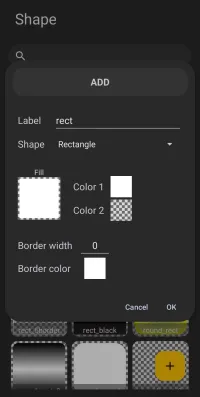
Rectangle Color Selection or Shape Selection dialog. Make selection above.
- Label - the title/name of the shape to be created which will be internally used by the launcher in it's previous screen dialog. This also becomes the shape's filename which is not changeable. Every user has their own design scheme. Attempt to name these shapes to complement that scheme.
- Shape - 4 basic shapes are available. Selection of one will pre-fill the label field with it's basic descriptive if the user has not already entered a label. If modifications to the basic shapes outline are available, an Options (gear) will appear next to it's descriptive.
- Rectangle - This shape is not modifiable at this stage but is at the page level Edit Mode
- Round rectangle - This shape is modifiable for its radius
- Oval - This shape is not modifiable at this stage
- Arc - This shape is modifiable for its arc
- Dropdown - allows the selection of different shapes:
- Round rectangle
- Oval
- Arc
- Fill - Defaults to solid white (FFFFFFFF) shown as Color 1
- Color 1 - The basic color of the shape which is user selectable color using a color picker or dynamic color
- Color 2 - Defaults to transparent (00000000) bit is user selectable color using a color picker or dynamic color and is the predominant color in any gradient pattern
- Border width - the width of notable edge of the object is user adjustable by selecting the dialog item and inputting a number. Default is 0 and max has not been determined but should be limited by the object's radius.
- Border color - color of the edge of the object as an outline which is user selectable using a color picker or dynamic color
- Cancel - void any input and return to the previous screen
- OK - activate any input and return to the previous screen
===== Hidden Index Anchors ===== ID1|Rectangle -> Selection for other shapes@53,134,177,154 ID2|Fill@14,168,64,224 ID3|Color 1@71,174,141,198 ID4|Color 2@71,197,141,223 ID5|Border color@15,256,110,281 ID6|Cancel@124,301,151,313 ID7|OK@154,299,185,313 { } cfg
Comments & Feedback
Toby Lancer is ready to help! Look for the Quick Help form:
► Desktop: left sidebar located near the bottom for Private to Admin
► Mobile: 3-bar menu at page top.
► Use the Discussion section below to share any experiences and communications with other Total Launcher users.
► Any Registered User can directly update this and any wiki page if desired.
Moderation: To keep the manual clean, all comments are held for appropriateness review. Preview any comment before submitting it. It will not be displayed after submission until it is reviewed. So, please, do not resubmit.
Formatting: If using any code snippets, place them inside code tags (e.g., 'code') using double single quotes (') before and after to keep them readable.
Be Kind: This is a community effort. Please keep feedback constructive and on topic.
~~DISCUSSION~~