Resource - Sound
Dialog selections are discussed below or next to the image. The image contains no navigation selections. To return to the previous page, swipe (right to left), use the browser's return arrow, or select the Backlink icon  from the right sidebar.
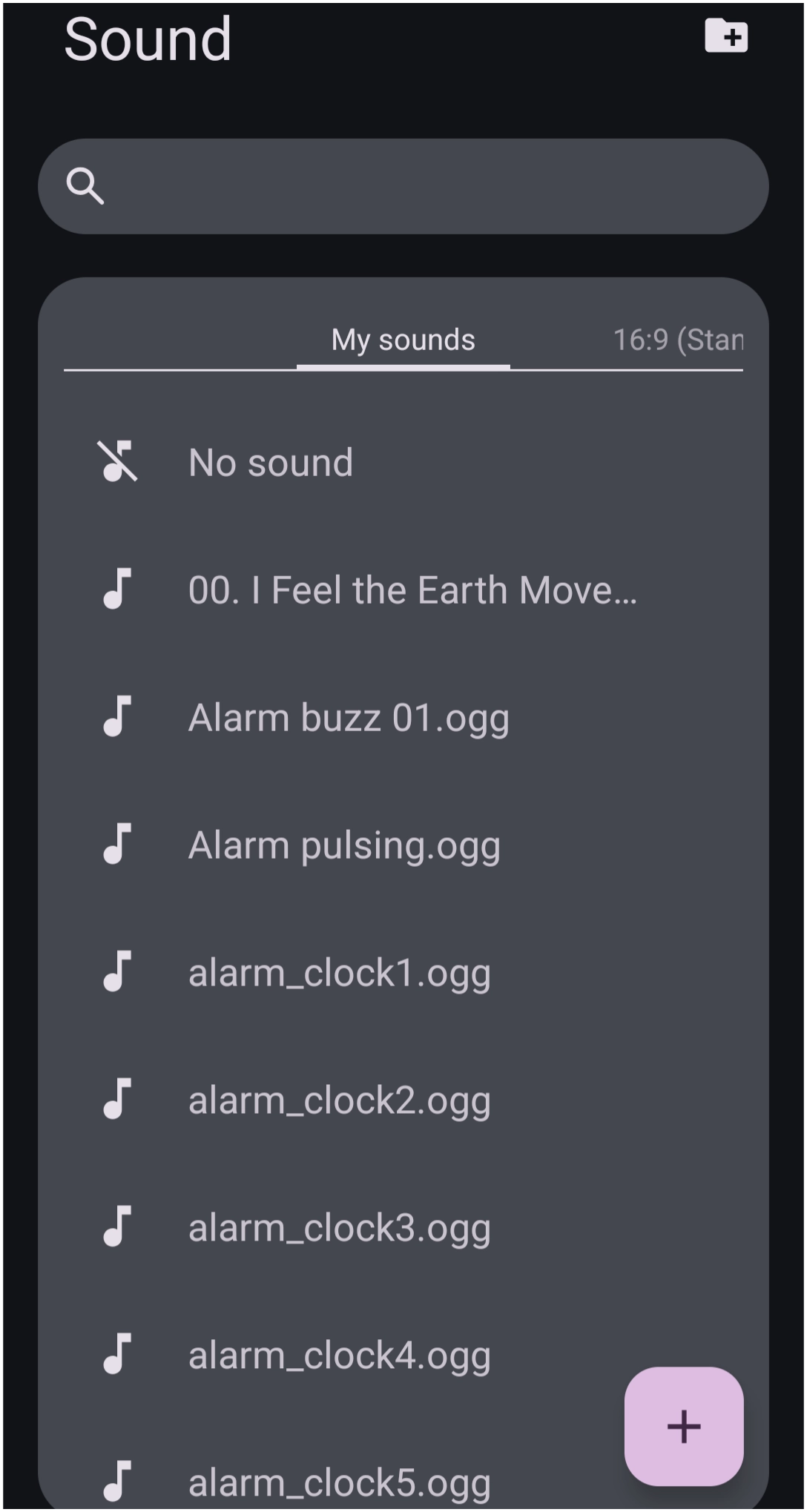
Resource - Sound dialog.
The Sound Resource manager centralizes audio assets used for launcher gesture interactions, tactile touch feedback, and object launch sounds across layouts, widgets, and buttons:
- Add Folder
 : Opens the storage file manager to batch import an entire directory of audio files into the library.

- Search Bar
 : Filters sound files by filename or assigned label.

- My sounds: Displays all currently imported user audio files, system sounds, and custom sound effects.
- 16:9 Standard: A ratio tab that organizes any previous sound sets configured across specific screen profile layouts. Additional ratios include:
- 18:9 (Medium screen)
- 18.5:9 (Long screen)
- 19:9 (Long screen medium)
- 19.3:9 (Long screen mediu +)
- 19.5:9 (Long screen +_
- 20:9 (Extra long screen)
- 21:9 (Super long screen)
- 22:9 (Flip (Super long screen)
- 25.9+22.5:18 (Fold)
- 25.9 (Extremely long screen)
- 22.5:18 (Squarish screen)
- 5.8 (Tablet)
- No sound: Removes any assigned audio clip, muting the selected gesture or launch interaction.
- Sound Clip Items
 Tapping the note icon previews the selected clip while tapping the clip title (e.g.,
 Alarm buzz 01.ogg,alarm_clock1.ogg) selects the clip.

- Add File
 : Opens the Android file manager to navigate for importing individual sound files (such as .ogg, .mp3, .wav) directly into the library.
Comments & Feedback
Toby Lancer is ready to help! Look for the Quick Help form:
► Desktop: left sidebar located near the bottom for Private to Admin
► Mobile: 3-bar menu at page top.
► Use the Discussion section below to share any experiences and communications with other Total Launcher users.
► Any Registered User can directly update this and any wiki page if desired.
Moderation: To keep the manual clean, all comments are held for appropriateness review. Preview any comment before submitting it. It will not be displayed after submission until it is reviewed. So, please, do not resubmit.
Formatting: If using any code snippets, place them inside code tags (e.g., 'code') using double single quotes (') before and after to keep them readable.
Be Kind: This is a community effort. Please keep feedback constructive and on topic.
~~DISCUSSION~~