Table of Contents
Page Background
Dialog selections are discussed below the image. To navigate to an item, select it in the [insert] image. If NOT selecting any item and wanting to return to the prior page: swipe right-to-left; use the browser’s ‘back’ arrow, or use the Wiki’s Backlink icon on the right sidebar (mobile: drop-down dialog at the top of the page).
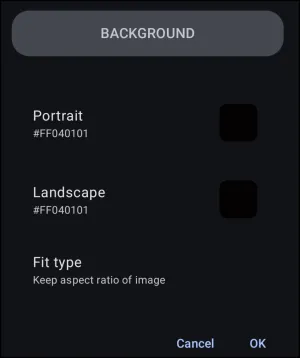
Page Background dialog. Make selection above.
Portrait vs Landscape
Device viewing position is a key feature of Total Launcher, allowing unique design layouts for the device's two usable positions. Most objects occupy specific coordinates (X/Y axis), but standard Android systems often fail to retain proportionate relationships when rotating between vertical (portrait) and horizontal (landscape) modes.
Total Launcher separates these layouts, allowing the user to specify unique designs or backgrounds for each orientation.
A review of the “background” options shown in this dialog is below:
- Portrait & Landscape - A bounding box will display either the image, shape, or the color hex number of the current background (this demo was using a black background). A checkerboard pattern indicates transparency (no background selected). Tap either to show background options for color, shape, or image; portrait and landscape are independent.
- Type fit - This defines how the Launcher handles an image or shape to the screen/page dimensions. Click here learn more about:
- Keep aspect ratio of image
- Stretch to screen
- Stretch to content
- Cancel - Accepts no changes made to the dialog and exits to the previous screen.
- OK - Accepts any changes made and exits to the previous screen.
===== Hidden Index Anchors ===== ui-generic-background ui-edit_on-page_background-fit_type ui-launcher_menu-edit_on
Comments & Feedback
Toby Lancer is ready to help! Look for the Quick Help form:
► Desktop: left sidebar located near the bottom for Private to Admin
► Mobile: 3-bar menu at page top.
► Use the Discussion section below to share any experiences and communications with other Total Launcher users.
► Any Registered User can directly update this and any wiki page if desired.
Moderation: To keep the manual clean, all comments are held for appropriateness review. Preview any comment before submitting it. It will not be displayed after submission until it is reviewed. So, please, do not resubmit.
Formatting: If using any code snippets, place them inside code tags (e.g., 'code') using double single quotes (') before and after to keep them readable.
Be Kind: This is a community effort. Please keep feedback constructive and on topic.
~~DISCUSSION~~